Setting up Neo Product Blocks takes just a few minutes. Follow the steps below to start creating dynamic Shopify product pages.
Step 1: Install the App
Install Neo Product Blocks from the Shopify App Store.
No manual theme edits are required—the app is quick and easy to set up.
Step 2: Choose Your Block
After installation, select the block you want to use:
- Variant Description
- Variant Gallery
- More blocks coming soon
Step 3: Set Up the Metafield
For the block you'd like to use:
- Open the Neo Product Blocks app dashboard.
- Click Setup Metafield.
- Follow the on-screen instructions to create the required metafield.
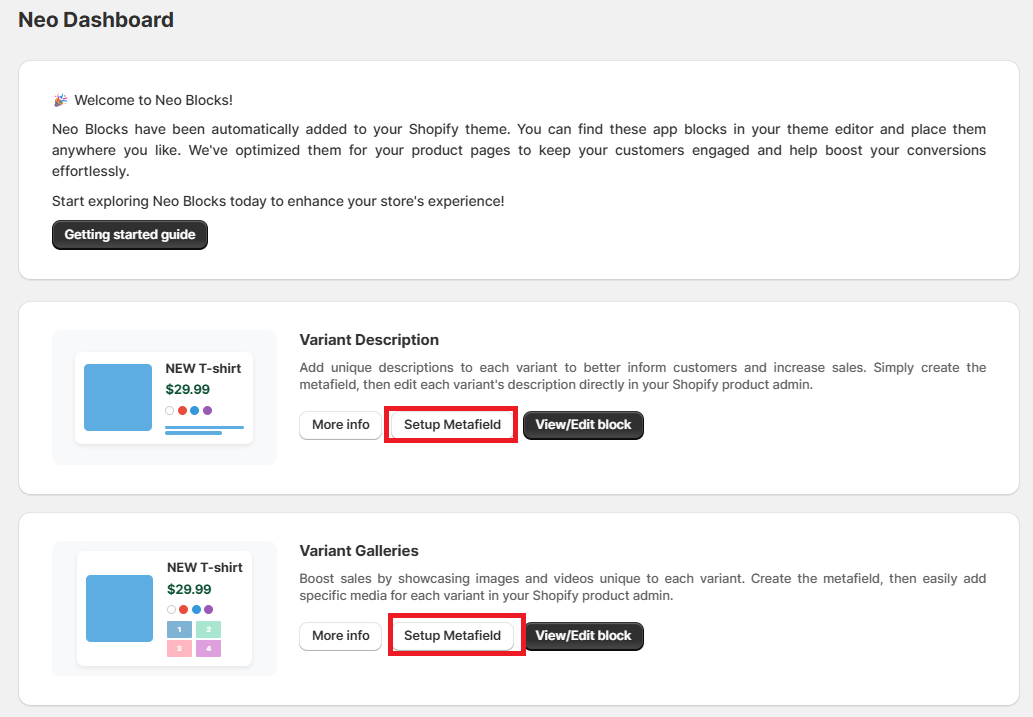
Step 4: Customise Your Block
Click View/Edit Block to personalise its appearance.
You can easily customise:
- Colours
- Typography
- Spacing
- Layout
All changes can be made directly from the app—no coding required.
Need Help?
If you have any questions or need assistance, our support team is happy to help.
- Raise a support ticket through the app.
- Email us at [email protected].