The steps to delete metafields created by any Neo Product Block are the same. The example below uses the Variant Description Block, but you can follow the same process for any Neo block.
When you set up the Variant Description Block, the app automatically creates the neo.variant_description metafield at the Variant level.
Step 1: Open Variant Metafields
- Go to Shopify Admin → Settings.
- Select Metafields and Metaobjects.
- Click Variants.
You'll see a list of all metafields created for your product variants.
Step 2: Delete the Metafield
- Locate the
neo.variant_descriptionmetafield (or the relevant Neo metafield). - Click the ⋯ (three dots) next to it.
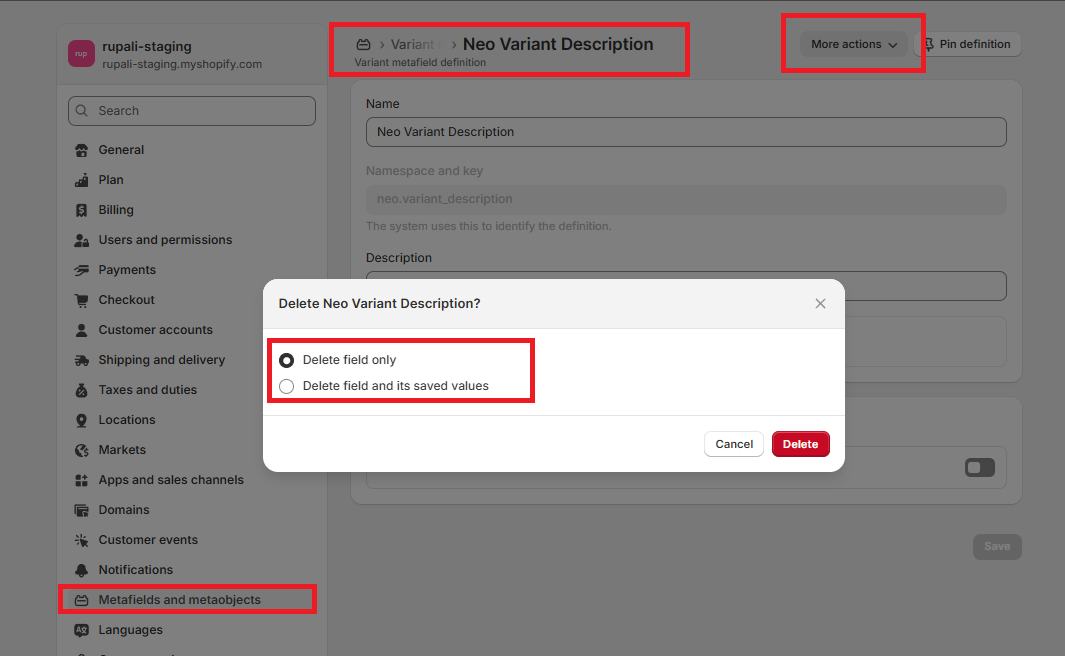
- Select Delete definition.
Shopify will present two options:
Delete the Field Only
- Removes the metafield definition.
- Keeps all existing values.
- If the block is still added to your theme, previously saved content may continue to appear on your product pages.
Delete the Field and Its Saved Values
- Removes both the metafield definition and all stored values.
- The block content will no longer appear on your storefront.
Note: These steps apply to all metafields created by Neo Product Blocks, not just the Variant Description Block.
Need Help?
If you have any questions or need assistance, our support team is happy to help.
- Raise a support ticket through the app.
- Email us at [email protected].