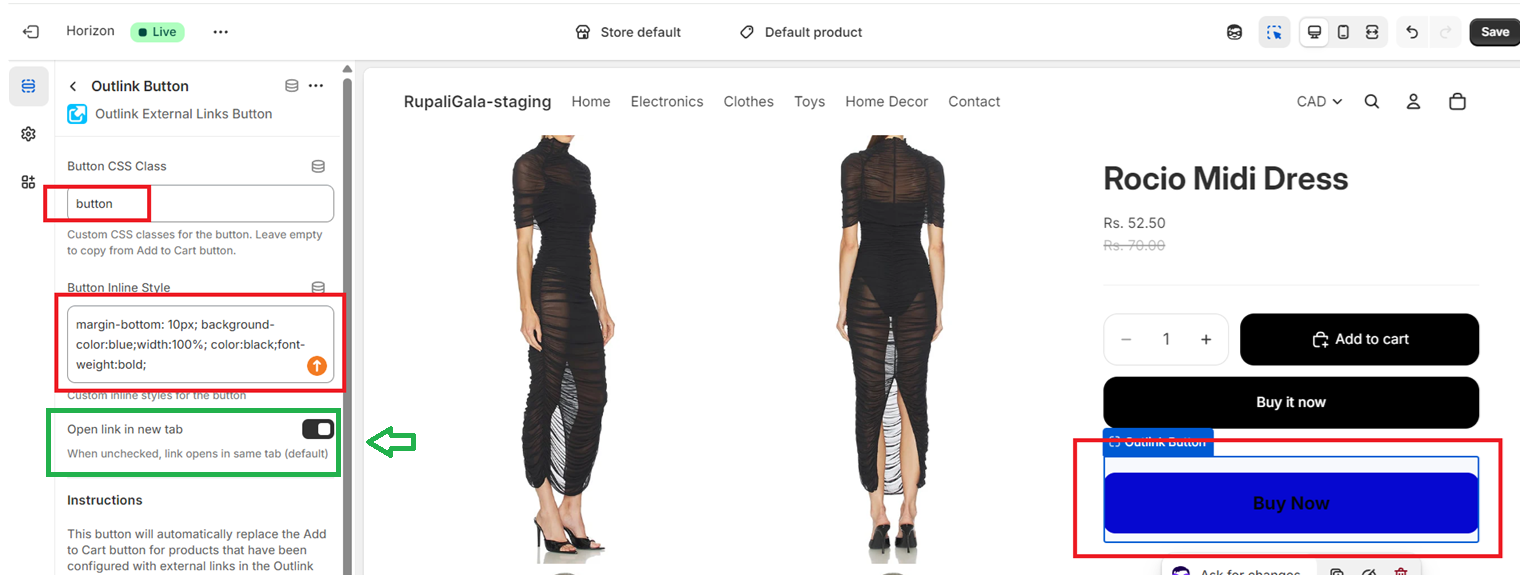
To redirect the external link to the New Tab, you simply need to enable the "new tab" switch (Marked in Green) in the app block itself.
Related articles
'Add to cart' button is NOT getting replaced with external link buttonThis could be because of any of the following reasons: Outlink code not integrated/integrated incorrectly - You need to follow the steps mentioned here to integrate Outlink with your site. Theme changCan I cancel my subscription any time?Yes, you can cancel at any time by uninstalling the Outlink App from your store. Your subscription will be canceled, and no further payments will be deducted. And the best thing is, external links addHow do I uninstall Outlink App?You can uninstall the Outlink app through your Shopify store admin. Go to your Shopify admin. Go to Apps. Click on the Apps and sales channel settings. A pop-up window will open wherein you will findWhat happens to Outlinked products when app is uninstalled?If you uninstall/remove the app the Outlinked products continue to work normally (provided you do not remove the Outlink integration code manually.) Products will continue to link out to external siteWhich sales channels are supported by the Outlink app?Currently, we only support the " Online store " sales channel. There is no way for users to be redirected to the outside websites when clicking on a product on the Facebook shop or any other sales cha