In short: By default, Shipr fulfills orders automatically when your Shopify SKUs perfectly match your Amazon FBA SKUs. If you use different SKUs across the two platforms, you can use the SKU Mapping feature to formally link them together so automated fulfillment continues seamlessly.
Why Map SKUs?
Shipr relies on matching SKUs to know exactly which physical product to fulfill via FBA. If a product on your Shopify store has a completely different SKU than its corresponding product on Amazon, the app cannot ship it automatically. The SKU mapping service acts as a bridge, allowing you to link these mismatched identifiers.
Example Scenario
Let's say you sell a specific product, but it has different SKUs on each platform:
- Shopify SKU:
B07N7MGX9T - Amazon FBA SKU:
2Y-QSSP-V4H0
By mapping these two together in the app, anytime B07N7MGX9T is ordered on your Shopify store, Shipr will automatically know to fulfill 2Y-QSSP-V4H0 via Amazon FBA.
How to Set Up SKU Mapping
- Open the Shipr dashboard inside your Shopify Admin.
- Navigate to Settings > SKU Map.
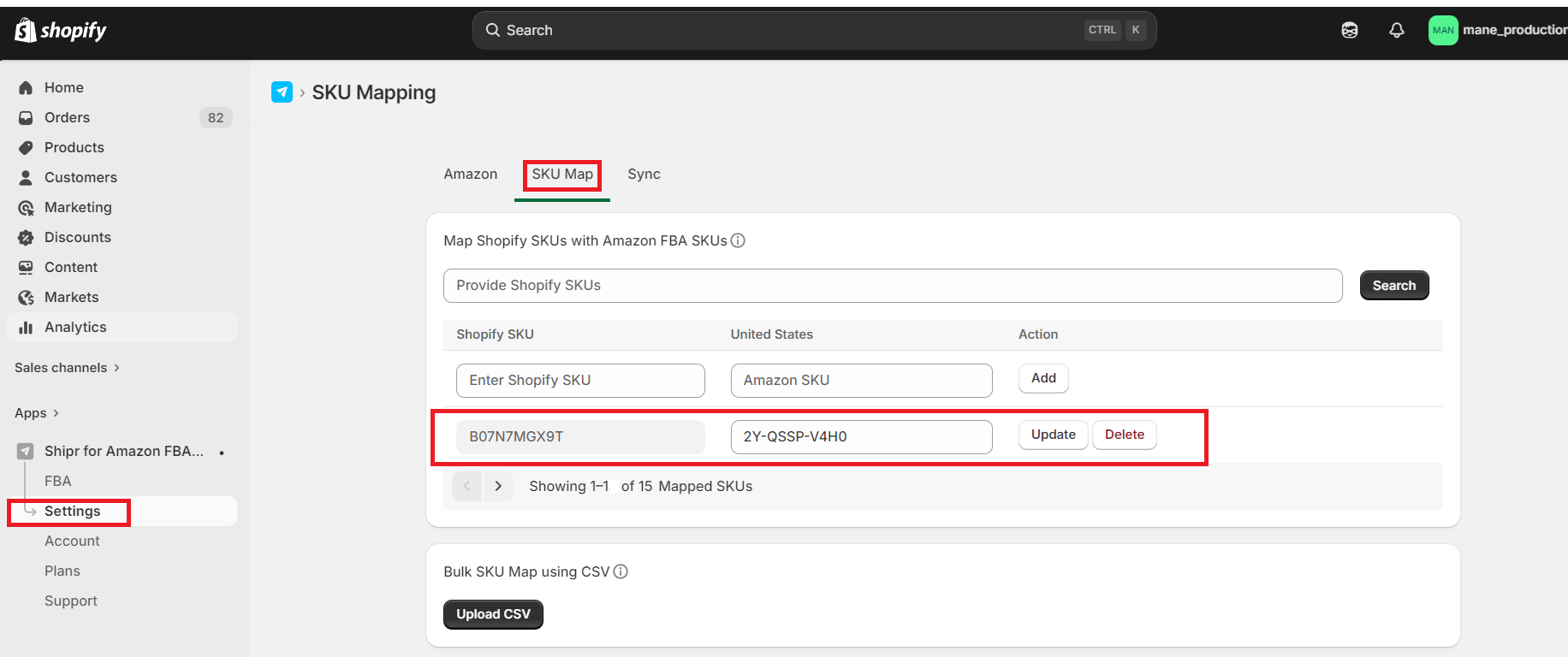
- Enter your Shopify SKU alongside its corresponding Amazon FBA SKU and click save to lock in the linkage.
Multi-Region Support: You can even map completely different SKUs for each specific Amazon FBA region if your international inventory uses different naming conventions!