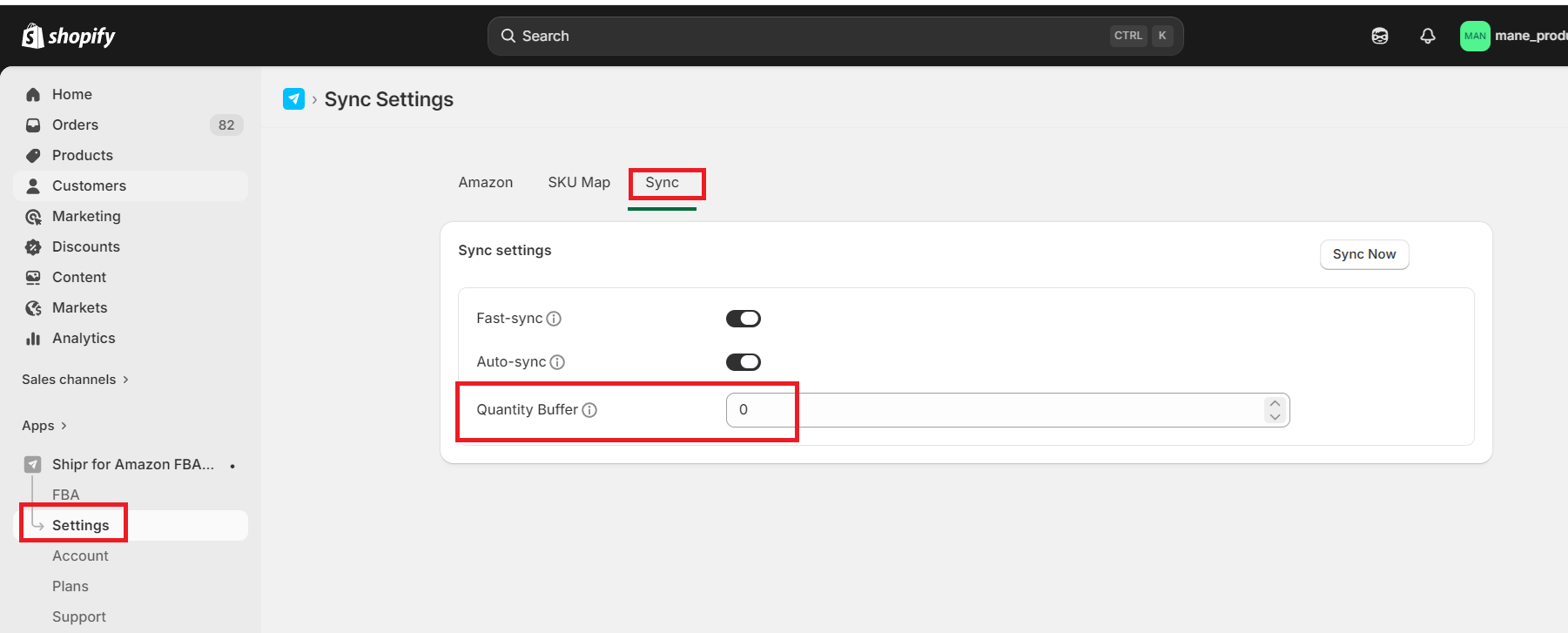
The Sync Quantity Buffer helps prevent overselling by reserving a specified number of units when syncing inventory from Amazon FBA to Shopify.
Instead of syncing the exact Amazon inventory, Shipr subtracts the configured buffer value before updating inventory in Shopify.
How It Works
During inventory synchronization, Shipr uses the following formula:
Shopify Inventory = Amazon Inventory − Sync Quantity Buffer
For example:
Amazon Inventory | Sync Quantity Buffer | Inventory Synced to Shopify |
|---|---|---|
100 | 0 | 100 |
100 | 5 | 95 |
25 | 2 | 23 |
Default Buffer Value
The default Sync Quantity Buffer is 0.
This means Shipr synchronizes the exact inventory quantity available on Amazon to Shopify.
Why Use a Sync Quantity Buffer?
When an Amazon FBA order is placed, Amazon does not immediately deduct inventory.
Initially, the order remains in the Pending state. Inventory is updated only after the order status changes to one of the following:
- Unshipped
- Partially Shipped
- Shipped
Depending on Amazon's processing time, this update can take anywhere from a few minutes to several hours.
During this delay, Shopify may temporarily display more inventory than is actually available, increasing the risk of overselling.
By configuring a Sync Quantity Buffer, Shipr always keeps your Shopify inventory slightly lower than your Amazon inventory, reducing this risk.
Benefits of Using a Buffer
- Helps prevent overselling.
- Compensates for Amazon's inventory update delay.
- Maintains more accurate inventory levels in Shopify.
- Ideal for high-volume stores with frequent orders.
Best Practice
If your products sell frequently, consider setting a small buffer (for example, 2–5 units) to reduce the likelihood of overselling while Amazon updates inventory after new orders.