If you receive the "Your software application authorization is about to expire" email from Amazon, you'll need to renew Shipr's authorization to maintain uninterrupted access to your Amazon Seller account.
The Shipr app uses this authorization to access your Amazon Seller account for activities such as:
- Reading product and inventory data
- Fulfilling Amazon FBA orders
- Synchronizing order and inventory information
Important: Amazon requires third-party application authorizations to be renewed every 12 months. If the authorization expires, Shipr will no longer be able to communicate with your Amazon Seller account until it is renewed.
Steps to Renew Authorization
1. Open User Permissions
Log in to your Amazon Seller Central Admin account.
Navigate to:
Settings → User Permissions
2. Open Manage Your Apps
Scroll down to the Third-Party Developer and Apps section.
Click Visit Manage Your Apps.
3. Locate Shipr
Find Shipr in the list of authorized applications.
Click Renew next to the app.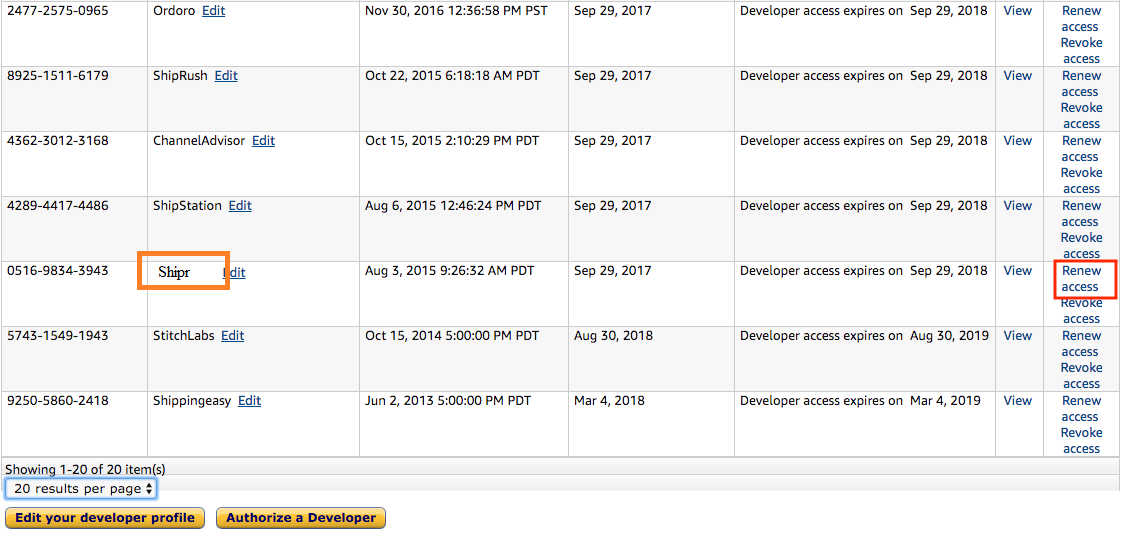
4. Confirm Renewal
Click Renew again to confirm the authorization.
5. Verify the Renewal
Once completed, the Authorization Date for Shipr will update to the current date.
This confirms the renewal was successful, and the next expiration date will be one year later.
Tip: Renew your authorization as soon as you receive Amazon's reminder email to avoid any interruption in order fulfillment or inventory synchronization.