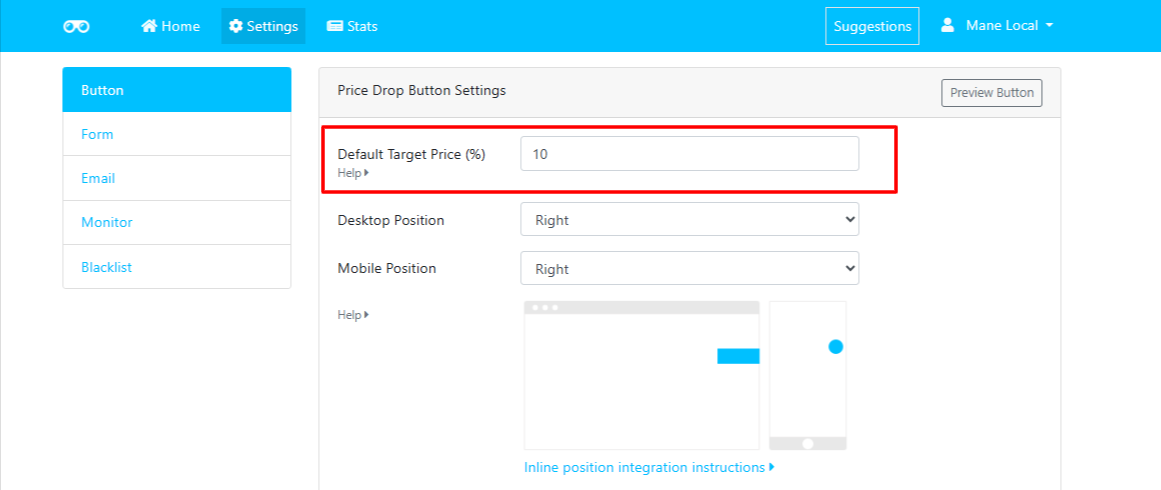
The Default Target Price (%) setting allows you to define the default price drop percentage that is pre-filled when customers subscribe to a price drop alert.
This makes it easier for customers to set their desired target price while giving you control over the default value displayed on your Shopify storefront.
How It Works
By default, Watchlyst sets the Target Price to 10% below the current product price.
Default Value
- Default Target Price: 10%
The app automatically calculates the target price using the percentage you specify.
Example
If a product is priced at $100:
- Current Price: $100
- Default Target Price (10%): $90
When the customer opens the Price Alert form, the target price field will be pre-filled with $90.
Customise the Default Percentage
You're not limited to the default 10% value.
You can set any percentage that best suits your store's pricing strategy, such as:
- 5%
- 10%
- 15%
- 20%
- ...or any other percentage of your choice.
How to Change the Default Target Price
- Open Shopify Admin.
- Navigate to Apps → Watchlyst – Price Alerts.
- Go to Settings → Button → Price Drop Button Settings.
- Locate the Default Target Price (%) field.
- Enter your preferred default percentage.
- Click Save to apply your changes.