The Multi-Language Support feature allows the Price Drop Button text to be displayed in the same language selected by the visitor on your Shopify store. This ensures a seamless and localized experience for international customers.
How It Works
When a visitor changes the language on your Shopify storefront, the Watch Price button automatically displays the text in the corresponding language that you've configured within the Watchlyst app.
Setup Steps
1 Enable Multi-Language Support: Open the Watchlyst Dashboard and turn ON the Support Multi-languages toggle.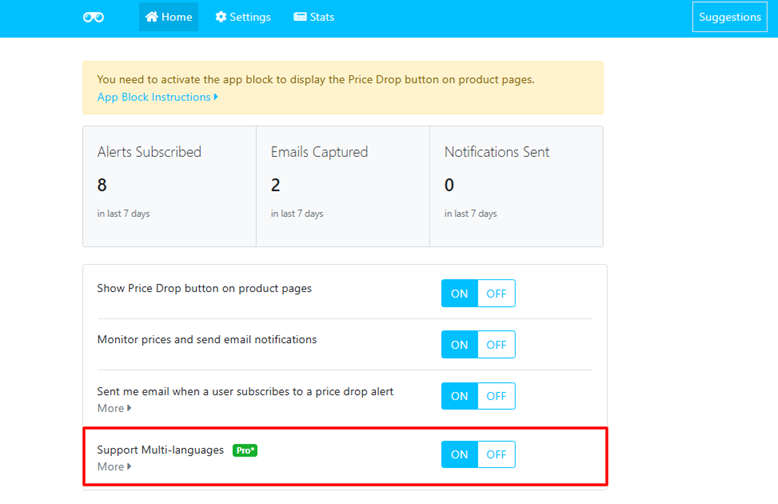 2 Configure Button Text
Navigate to: Settings → Button Text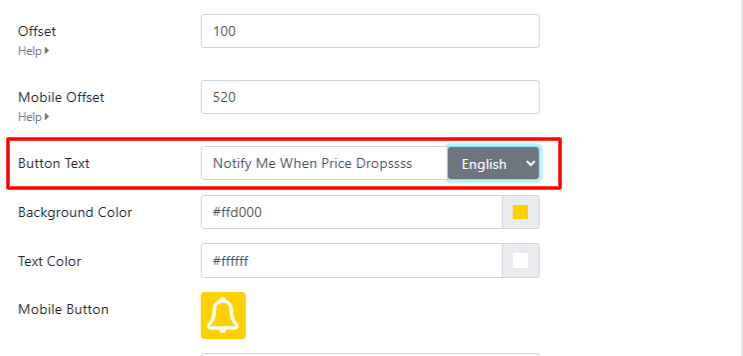
3 Add Translations
For each active language in your Shopify store:
- Select the language from the dropdown menu.
- Enter the button text you want to display for that language.
- Click Save.
Repeat these steps for every language you've enabled in your Shopify store.
Important Notes
- Make sure your Shopify store has multiple languages enabled from your Shopify Admin before configuring translated button text.
- This feature is available only on the Basic plan.